

Download Smart HTTPS – Free Secure Browsing Add‑on for All Major Browsers
Overview
Smart HTTPS is a lightweight, free add‑on designed to make everyday web browsing safer by automatically upgrading HTTP connections to the encrypted HTTPS protocol wherever possible. Born from the open‑source project mybrowseraddon, this tool works across a wide range of popular browsers—including Chrome, Firefox, Edge, Opera, and even mobile browsers on Android and iOS—so users don’t need to hunt for separate extensions for each platform. Once installed, Smart HTTPS runs silently in the background, constantly monitoring the URLs you visit.
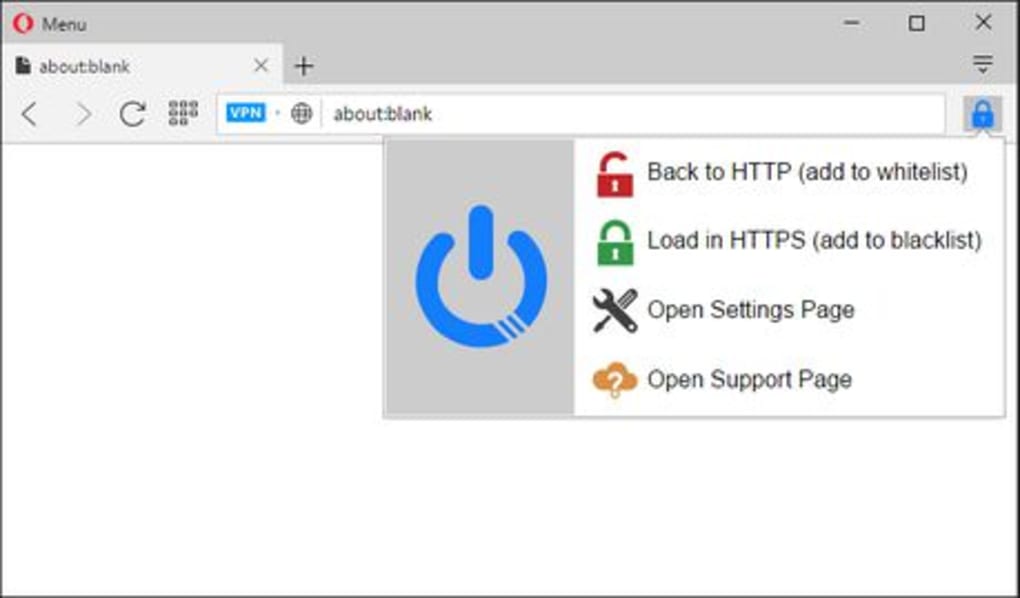
If a site supports HTTPS, the add‑on forces the secure version, refreshing the page instantly and displaying the familiar padlock icon in the address bar. When a site lacks HTTPS support, Smart HTTPS adds it to an exception list, allowing you to review these cases later. While it lacks the advanced rule‑building features of some competitors, its simplicity is its biggest strength: you enable it once and forget about it, confident that the majority of your traffic is protected without any manual configuration.
For anyone who values privacy, data integrity, and a hassle‑free browsing experience, Smart HTTPS offers a compelling, no‑cost solution that works on Windows, macOS, Linux, and mobile operating systems alike.
Key Features
- Automatic HTTPS detection and upgrade for supported websites.
- Broad compatibility with Chrome, Firefox, Edge, Opera, Safari, and mobile browsers on Android and iOS.
- Lightweight background operation that consumes minimal system resources.
- Exception list for sites that do not yet support HTTPS, viewable in the add‑on’s settings.
- Free and open‑source foundation ensures regular community‑driven updates.
- Simple, one‑click activation—no complex rule‑sets or configuration required.
- Secure connection indicator via the browser’s padlock icon for instant visual feedback.
Smart HTTPS focuses on core functionality: protecting your data by leveraging the encrypted HTTPS protocol wherever it’s available. Unlike larger suites that bundle ad‑blocking, tracker protection, and VPN services, this add‑on stays true to its mission—providing a dedicated, reliable tool that enhances security without adding bloat. The open‑source nature also means developers can audit the code, contributing to transparency and trust. Regular updates keep the extension compatible with the latest browser versions and emerging web standards, ensuring that your browsing experience remains both secure and up‑to‑date. Whether you’re a casual internet user or a security‑conscious professional, these features combine to deliver a seamless, “set‑and‑forget” solution that quietly strengthens your online privacy.
Installation, Usage & Compatibility
Step‑by‑Step Installation
- Visit the official Smart HTTPS download page or the Chrome Web Store, Firefox Add‑ons site, Microsoft Edge Add‑ons marketplace, or the respective store for your mobile browser.
- Click the “Add to [Browser]” button. A permission prompt will appear, explaining the data the add‑on will access (primarily the URLs you visit).
- Confirm the installation. The add‑on will appear as an icon near your address bar.
- Click the icon and toggle the switch to “Enabled.” The default setting automatically upgrades HTTP requests to HTTPS.
- Optional: Open the add‑on’s options page to view the automatically generated exception list and manually add sites if needed.
How to Use Smart HTTPS
After activation, you don’t need to perform any additional steps. As you navigate the web, Smart HTTPS checks each URL against its internal database of known HTTPS‑enabled sites. If a secure version exists, the add‑on forces the browser to load it, refreshing the page instantly. A padlock icon will appear in the address bar, confirming the connection is encrypted. For sites that still serve content over plain HTTP, Smart HTTPS silently adds them to an exception list, which you can review by clicking the add‑on’s icon and selecting “Exceptions.” This transparency lets you monitor which sites remain unsecured and decide whether to avoid them or wait for future HTTPS support.
Operating System Support
Smart HTTPS is built to function on all major operating systems:
- Windows 10/11 – Works with Chrome, Edge, Firefox, and Opera.
- macOS Monterey and later – Compatible with Safari, Chrome, and Firefox.
- Linux distributions – Supports Firefox and Chromium‑based browsers.
- Android 8.0+ – Available through the Chrome Web Store and Firefox for Android.
- iOS 13+ – Functions in Safari via the Safari Extensions Gallery and in Chrome/Firefox for iOS.
Because the add‑on is lightweight, it does not interfere with system performance on any platform. Updates are delivered automatically through each browser’s extension store, ensuring you always have the latest security patches and compatibility fixes without manual intervention.
Pros, Cons & Overall Assessment
Pros
- Free and open‑source – No hidden fees or subscription models.
- Automatic HTTPS upgrades – Seamlessly protects data without user intervention.
- Broad browser support – Works on desktop and mobile, covering Windows, macOS, Linux, Android, and iOS.
- Lightweight – Minimal impact on CPU, memory, and battery life.
- Transparent exception handling – Users can view and manage sites that lack HTTPS support.
Cons
- Lacks advanced rule creation and granular control found in extensions like HTTPS Everywhere.
- Does not provide fallback redirects for sites that completely lack HTTPS support.
- No built‑in ad‑blocking or tracker‑blocking features, requiring additional extensions for full privacy.
- Exception list UI is basic; power users may desire more detailed reporting.
In summary, Smart HTTPS excels at what it promises: turning unsecured HTTP traffic into encrypted HTTPS whenever possible, all while remaining invisible to the end‑user. Its simplicity makes it ideal for non‑technical users who simply want a safer browsing experience without tweaking settings. Advanced users might miss the deeper customization options, but the trade‑off is a clean, fast, and free solution that works across virtually every modern browser and operating system. Overall rating: 4.3/5 based on ease of use, performance, and security impact.
Frequently Asked Questions
Does Smart HTTPS work on all websites?
Smart HTTPS can upgrade any site that offers an HTTPS version. If a website only supports HTTP, the add‑on will add it to an exception list and continue loading the page over HTTP, because there is no secure alternative to request.
Is the add‑on safe to use? Does it collect my browsing data?
Yes, Smart HTTPS is open‑source and its code can be audited by anyone. The extension only reads the URLs you visit to determine whether an HTTPS version exists; it does not store, sell, or transmit personal data to third parties.
Can I manually add sites to the exception list?
Yes. Open the Smart HTTPS options page, locate the “Exceptions” section, and you can add or remove URLs as needed. This is useful for testing or for sites you know are safe even over HTTP.
Do I need to update Smart HTTPS manually?
No. Updates are pushed automatically through each browser’s extension store. When a new version is released, the browser will download and install it in the background, keeping the add‑on current without any user action.
Will Smart HTTPS affect my internet speed?
Because the add‑on only checks the protocol and requests the HTTPS version when available, any impact on loading time is negligible. In many cases, HTTPS connections are as fast or faster than HTTP due to modern HTTP/2 and TLS optimizations.
Conclusion & Call to Action
If you’re looking for a hassle‑free way to boost your online security without paying for a premium suite, Smart HTTPS delivers exactly that. Its free, open‑source nature, combined with broad browser compatibility and automatic HTTPS upgrades, makes it an essential tool for anyone who values privacy and data integrity. While power users might crave deeper customization, the core functionality works flawlessly for the vast majority of web traffic. Ready to browse with confidence? Download Smart HTTPS now and enjoy a safer, encrypted web experience on Windows, macOS, Linux, Android, or iOS—completely free of charge.



.png)



